
Key Takeaways
- Microsoft's incident record lists the Exchange Online outage from 4:20 p.m. UTC on November 12 to 4:10 p.m. UTC on November 13, 2026.
- Microsoft's service agreement gives a bill credit only to customers who file a claim, and November claims are due by December 31.
- Of 1,317 small shop domains with a mail server in our November 15 sample, 219 route their mail to Microsoft 365.
The Microsoft 365 outage is over, so there is nothing left for a business owner to do. That is the common read this weekend, and it is wrong on three counts. Mail sent to you during the outage may have bounced. A credit on your bill exists only if you ask for it by December 31. And Microsoft has not yet published its full report on what broke.
Background: setting up email on your own domain.
Microsoft marked the incident as restored late Friday night, November 13, Eastern time. We read its incident record line by line. What it says, and what to do with it this week, follows.
What Microsoft's Record Says
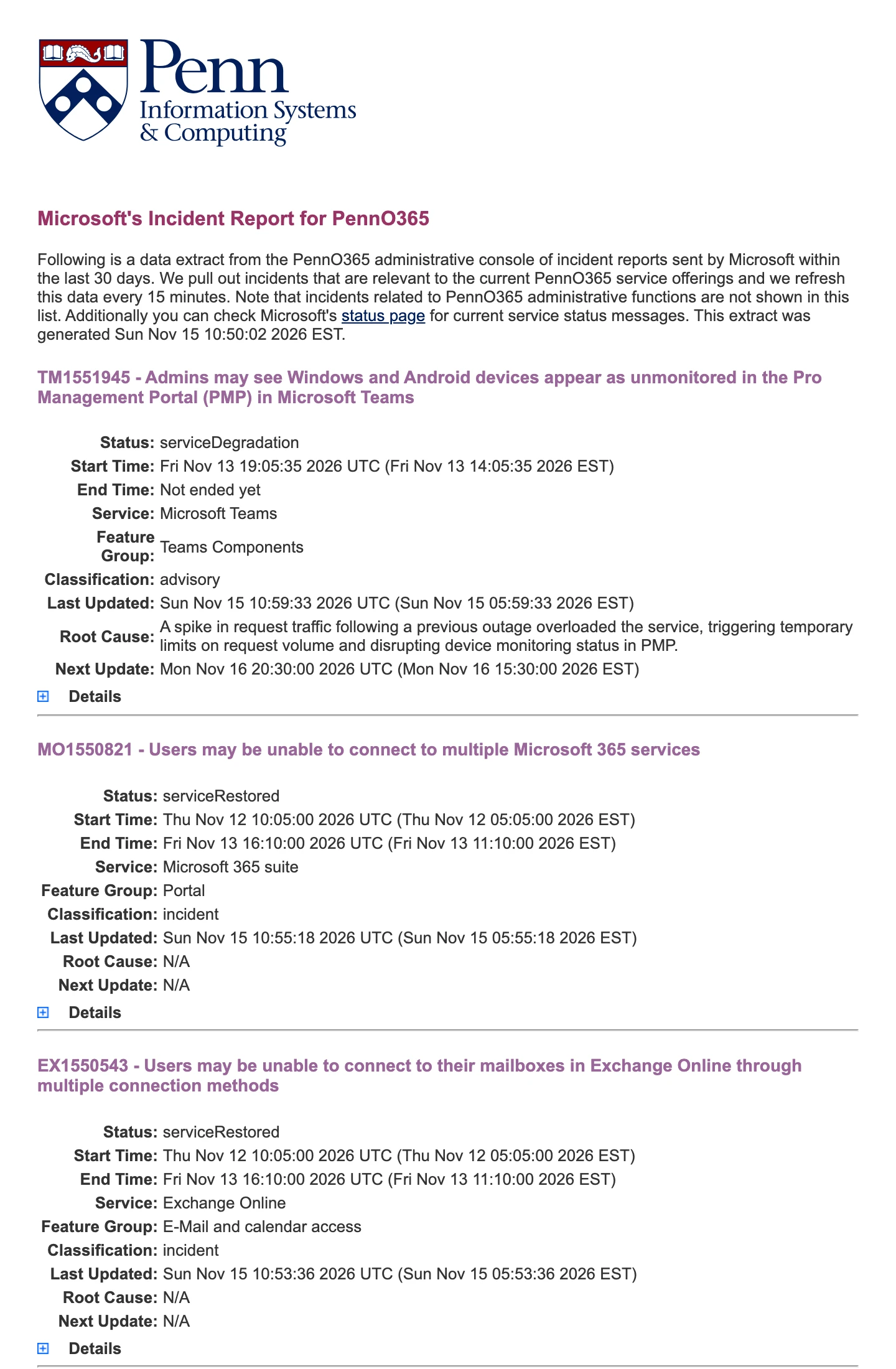
Microsoft tracks the outage under two incident numbers. EX1550543 covers Exchange Online, the service behind Outlook and company mail. MO1550821 covers the other Microsoft 365 services that lean on it. The public status page does not keep the history, so we used the University of Pennsylvania's copy of the records Microsoft sends to its admin console.
- The written record puts the start at 4:20 p.m. UTC on Thursday, November 12. That is 11:20 a.m. Eastern and 8:20 a.m. Pacific.
- It puts the end at 4:10 p.m. UTC on Friday, November 13. That is 23 hours and 50 minutes.
- A second field on the same record lists the start as 10:05 a.m. UTC on November 12. By that clock the outage ran 30 hours and 5 minutes. Microsoft has not explained the gap.
- Microsoft posted its final status at 11:15 p.m. Eastern on Friday, November 13.
People could not open their mailboxes in Outlook on the web, in desktop Outlook or on phones. Teams calendars, Copilot, the Defender security portal, Intune and Power Apps had trouble too, because each one depends on Exchange.
We are deeply sorry for the disruption this incident has caused you and your business.
What Broke
Microsoft says the outage was a "technical issue not related to cyber or AI / agents." It says the problem was introduced during an earlier network capacity upgrade and surfaced after a recent network change.
The record adds a preliminary cause in more detail. Traffic moved around during routine network maintenance. That exposed a hidden bug in the systems that set up connections to Exchange Online. Requests piled up faster than the servers could clear them. The servers ran out of processing power and stopped taking new connections.
The repair was slow for the same reason. Servers that came back healthy fell over again once traffic reached them. Microsoft says it brought service back in stages and checked each stage before moving on.
One loose end is still open. A Teams advisory, TM1551945, began on November 13 and was still open in the November 15 copy of the record. Microsoft lists its cause as a spike in requests after the outage. It affects a device management screen for Teams admins, not calls or chat.
How Many Small Businesses Run on It
We wanted a number for how exposed small shops are. So on November 15, 2026 we picked 2,000 website domains at random from the independent car repair businesses we track. We looked up the public mail record for each one. 1,317 had a mail server set. The other 683 had none, or the domain no longer answered.
| Where the mail goes | Domains | Share of 1,317 |
|---|---|---|
| Microsoft 365 | 219 | 16.6% |
| 313 | 23.8% | |
| Older GoDaddy mail | 76 | 5.8% |
| Every other mail host | 709 | 53.8% |
So about one small shop in six that has email on its own domain hands that mail to Microsoft 365. The real share is likely a little higher, because some shops put a spam filter in front and the filter's name shows up in the record.
For those shops, quotes, parts orders and customer replies sent on Thursday had to wait.
First, Look for Mail That Never Arrived
Microsoft has not said any mail was lost. It said delivery was delayed. At 9:55 a.m. UTC on November 13 it stretched its own timeout for delayed mail to 48 hours to protect messages in its queue. Microsoft's mail flow documentation describes a normal window of 24 hours, after which a queued message goes back to the sender as a bounce.
Mail coming from outside is a different clock. The sending server decides how long to keep trying. The internet standard for email, RFC 5321, says a sender should keep trying for at least four to five days. That is a recommendation, not a guarantee. A website contact form, a booking tool or a supplier's order system may be set to try for far less time and then quit.
Microsoft also warned on Friday afternoon that mailbox access could come back before mail flow caught up. So an inbox that opened fine on Friday may still have been missing mail for hours.
- Send a test from your website contact form today and see that it lands.
- Check any booking, quote or payment tool that emails you. Look in the tool itself for requests from November 12 and 13.
- Ask anyone who was due to send you something on those days to send it again.
- If a customer says their message to you bounced back, believe them. The bounce was real and the fix is a resend.
- If you are still not receiving emails that others say they sent, treat it as a new problem and trace it.
Second, File for the Credit by December 31
Microsoft's service agreement promises 99.9 percent uptime for Exchange Online. When it misses, the customer can get a credit against that month's fee for the service. Microsoft does not send it on its own. You have to file a claim.
The October 2026 agreement says a claim for an incident must reach Microsoft by the end of the month after the incident. For an outage on November 12 and 13, that is December 31, 2026. Microsoft says it usually decides within 45 days.
The size of the credit depends on how long your users could not send or receive mail in Outlook on the web. The agreement counts it in minutes per user across the month. November has 43,200 minutes. Our math on the agreement's three tiers, for a shop where every user was locked out for the same stretch, works out as follows.
| Time your whole team was locked out | Uptime for November | Credit tier |
|---|---|---|
| Under 43 minutes | 99.9% or better | None |
| 43 minutes to 7 hours 12 minutes | Under 99.9% | 25% |
| 7 hours 12 minutes to 36 hours | Under 99% | 50% |
| Over 36 hours | Under 95% | 100% |
A shop that was out for Microsoft's full 23 hours and 50 minutes lands at 96.7 percent uptime, in the 50 percent tier. That is our reading of the published terms. Microsoft makes the final call on each claim.
Keep the size in view. The credit covers only the fee for the affected service for one month. The agreement says it will not pay for lost sales or any other loss. For a five person shop this is a small sum. It is still yours.
To file, the agreement asks for five things.
- A description of the incident. Give both incident numbers, EX1550543 and MO1550821.
- The time and length of your downtime.
- The names of what was affected, such as your domain and mailboxes.
- How many users were affected and where they are.
- The errors people saw. Screenshots help.
An admin on the account opens the request in the Microsoft 365 admin center, under Help and support. If you bought Microsoft 365 through a reseller, such as your web host or an IT company, Microsoft says to go to that partner for support. Ask them this week whether they are filing for you.
Third, Build Your Own Early Warning
If you found out about the outage from a customer, ten minutes of setup will fix that for next time.
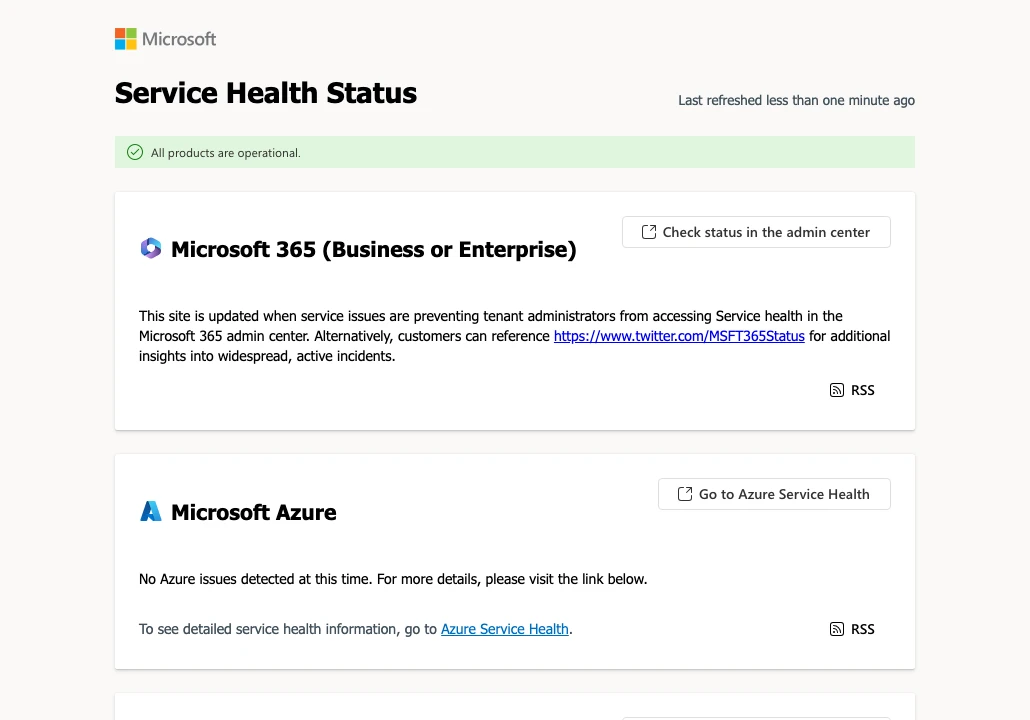
- Bookmark status.cloud.microsoft. Microsoft updates it when admins cannot reach the admin center.
- In the admin center, open Health, then Service health, then Customize, and turn on email alerts. Microsoft's service health guide says each admin can add two addresses. Make one of them an address that is not on Microsoft 365.
- Put a phone number on your website where a customer can see it without scrolling. When email is down, the phone still works.
- Write a short outage note for customers now, while it is fresh. One line for your website and one text for customers who are waiting on you.
What Comes Next
Microsoft says it will publish a preliminary Post Incident Report within two business days and a final one within five business days. Counting from the Friday night close, that points to about Tuesday, November 17 and Friday, November 20. The report will show up in the admin center under Service health, on the two incident numbers.
Read it when it lands. It should say what the bug was, why the fix took most of a day and what Microsoft will change. If the final report settles on the earlier start time, your downtime count gets longer, so it is worth reading before you send your claim. Just do not wait past December 31.
Before You Call
Is the Microsoft 365 outage over?
Yes. Microsoft marked both incidents, EX1550543 and MO1550821, as service restored late on November 13, 2026 Eastern time. Its record lists the end of impact as 4:10 p.m. UTC that day. A smaller Teams advisory tied to the outage was still open on November 15.
How long was Microsoft 365 down?
Microsoft's written record for Exchange Online runs from 4:20 p.m. UTC on Thursday, November 12 to 4:10 p.m. UTC on Friday, November 13, 2026. That is 23 hours and 50 minutes. A second field on the same record lists a start of 10:05 a.m. UTC, which would make it about 30 hours.
Did I lose email during the Microsoft outage?
Microsoft has not said any mail was lost. It said delivery was delayed and that it stretched its own timeout for queued mail to 48 hours. A message could still have bounced back to the sender if the sending system gave up early, so ask for a resend if something you expected never came.
Will Microsoft refund me for the outage?
Not on its own. Microsoft's service agreement offers a credit on a future bill, and only when the customer files a claim. For Exchange Online the credit is 25, 50 or 100 percent of that month's fee for the service, based on how long your users were locked out.
What is the deadline to claim a Microsoft 365 service credit?
For an incident in November 2026, Microsoft must receive the claim by December 31, 2026. The agreement sets the cutoff as the end of the month after the month of the incident.
What caused the Microsoft 365 outage?
Microsoft says it was a technical issue introduced during an earlier network capacity upgrade, which surfaced after a recent network change. It says the outage was not related to cyber activity or AI agents. A full report is still to come.
Terms in This Story
- Uptime
- The share of time a site is up and reachable.
- Web hosting
- Renting space on a server that is always on and online, so your site loads for anyone at any time.
Cited Pages
- Microsoft's Incident Reports for PennO365, incidents EX1550543 and MO1550821, University of Pennsylvaniamailservices.isc.upenn.edu
- Microsoft service health status, Microsoftstatus.cloud.microsoft
- Service Level Agreements (SLA) for Online Services, October 2026, Microsoft Licensingmicrosoft.com
- How to check Microsoft 365 service health, Microsoft Learnlearn.microsoft.com
- Get support, Microsoft 365 admin, Microsoft Learnlearn.microsoft.com
- Mail flow intelligence, Microsoft Learnlearn.microsoft.com
- RFC 5321, Simple Mail Transfer Protocol, section 4.5.4.1, RFC Editorrfc-editor.org
Spot an error? Tell us through our contact form. We fix mistakes in the open, as our corrections policy explains.

About Anthony Limpert
Anthony Limpert edits T3CHS. He founded Clickflame, a web and search agency in Long Beach, California, in 2004, and has built and run websites for small businesses since. He covers hosting, domains, business email, search and AI tools.
Author Source EEAT Authors · Anthony's Author Page
See more of our reporting when you search.
Want T3CHS first in Google? Set us as a preferred sourceElsewhere on the Site
Google Workspace Can Now Import Old Email During Setup
New Workspace admins can pull past email from any IMAP provider while they set up. It covers one user, which fits a lot of small businesses.