Guide
Fully Qualified Domain Name: What FQDN Means in Your DNS
A fully qualified domain name, or FQDN, is the complete name of one host in DNS, like www.yourgarage.com. Strictly written, it ends in a dot for the root. As an owner you type FQDNs in your mail and alias records, and a wrong one there can quietly stop your email.

Three Things to Know
- yourgarage.com, www.yourgarage.com and mail.yourgarage.com are all FQDNs. www on its own is not, and neither is a full web address with https in front.
- The longest FQDN you can type is 253 characters, with up to 63 in each part between the dots.
- Of 614 small business domains with mail records in our October 24, 2026 test, 35 pointed all their mail at a server name that no longer exists.
You'll read that an FQDN is just your domain with www in front. That's close, but it's not the full story. The DNS terminology standard says a strictly full name ends in a dot, written like www.example.net. with the dot on the end. It also admits that most people drop the dot and still call the name fully qualified.1
That last dot stands for the root of all DNS. Your browser hides it. Your DNS panel sometimes wants it.
The Parts of a Fully Qualified Domain Name
Read an FQDN from right to left. Each piece between the dots is called a label, and each one sits inside the one to its right.
| Piece | In shop.yourgarage.com. | What it does |
|---|---|---|
| Root | the last dot | The top of all DNS. Every name ends here, shown or not |
| Top level domain | com | The ending the registry runs |
| Your domain | yourgarage | The name you bought from a registrar |
| Host or subdomain | shop | A name you add yourself in your DNS records |
So which names count? A few examples make it clear.
- yourgarage.com is an FQDN. Your bare domain is a full name on its own.
- www.yourgarage.com is an FQDN. It names one host all the way up to the root.
- mail.yourgarage.com is an FQDN. That's the kind of name your mail records point at.
- www by itself is not. It only means something next to a domain. The standard calls that a partially qualified name, understood only by context.1
- A web address is not. In https://www.yourgarage.com/contact, only the www.yourgarage.com part is the FQDN. The rest tells the browser how to connect and which page to load.
The Real Length Limit Is 253 Characters
The DNS rules cap each label at 63 octets and a whole name at 255 octets.2 Most guides stop there and say 255. But those 255 octets are counted the way DNS sends a name over the network. Each label carries one extra byte for its length, and the root adds one more at the end.1
Take www.yourgarage.com. It's 18 characters typed and 20 bytes on the wire. That gap of two holds for any name, so the longest FQDN you can actually type is 253 characters.
You won't hit that on a business site. You might hit the 63 limit if you build a subdomain from a long phrase.
The other rules are short. Stick to letters, digits and hyphens, and don't start or end a label with a hyphen.2 A label may start with a digit, so 4x4parts.com is fine.3 Case doesn't matter, because DNS compares names without regard to case.2
Why the Trailing Dot Matters in Your DNS Panel
The dot isn't trivia. In a DNS zone file, a name that ends in a dot is taken as complete. A name without one is treated as relative, and the zone's own domain is stuck on the end.2
So type mail.yourgarage.com without the dot into a raw zone for yourgarage.com, and DNS reads it as mail.yourgarage.com.yourgarage.com. That name doesn't exist anywhere.
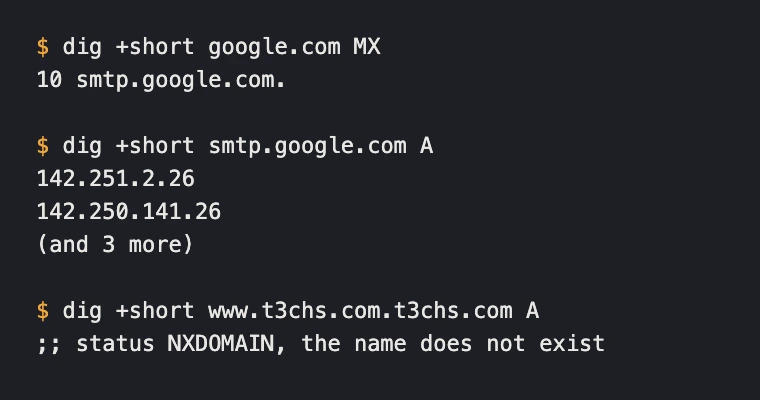
Most DNS panels shield you from this. They ask for only the left part in the Name or Host field, and they add the dot behind the scenes. That's why Google says to leave the host blank or type @ for your main domain.6 Microsoft's MX table uses @ for the host too.7
The value field is where it can bite. Google lists its mail server as smtp.google.com and notes that some registrars want a period at the end. Its advice is to follow your registrar's format.6 Microsoft warns that some registrars require an SRV target to end with a dot.7
- Host or Name field. Type only the left part. Use @ or leave it blank for the bare domain. Type mail for mail.yourgarage.com.
- Value or Target field. Paste the full name your provider gave you. Add the dot only if your panel's help says to.
- After you save, look it up. If the result shows your domain twice, delete the record and enter it again.
What We Found in 1,000 Small Business Domains
I wanted to know which FQDN mistakes real business owners actually make. So on October 24, 2026 we picked 1,000 independent auto repair shop domains at random from the shops we list. Between 7:12 and 7:13 in the morning Pacific time, we pulled each one's mail records and www record. Then we looked up every mail server name those records pointed to. Every failure got checked again a minute later on a second public resolver, and all of them still failed.
The doubled name never showed up. Not once in 614 sets of mail records or 635 www aliases. Panels catch that one.
What got through was worse. 614 of the 1,000 domains publish mail records. 35 of those point every mail record at a name that does not exist. That's about 1 in 18. Mail sent to those shops has no real server to land on.
- 28 pointed at a provider name that's gone. 18 used a hosted mail plan's name for that customer, and 10 used a Microsoft 365 mail name. A name like that only exists while the provider still serves the domain. When it goes away, the record at the shop stays behind.
- 5 pointed at mail under their own domain. Names like mail.theirshop.com that don't exist in their own DNS.
- 2 pointed at an old web host's mail server that no longer exists.
Two other mistakes showed up in working setups. 5 domains pointed a mail record at an alias, a CNAME. The DNS rules say the value of a mail record must not be an alias.4 Two of those aliased mail.theirshop.com right back to the bare domain.
One domain listed a mail server name ending in .invalid. That ending is reserved, and resolvers may assume it never exists.5 It looks like a placeholder someone pasted and never replaced.
Where You Type an FQDN as an Owner
You don't need an FQDN to visit a site. You need one every time you tell DNS where something lives.
| Where | What goes in | Example |
|---|---|---|
| Mail record (MX) value | Your mail provider's server name | smtp.google.com6 |
| Alias (CNAME) value | The full name you're aliasing to | enterpriseregistration.windows.net.7 |
| Host or Name field | Only the left part, or @ | www, mail, @ |
| Email app server settings | Your provider's incoming and outgoing server names | See our IMAP vs POP3 guide |
Every name in a value field is a promise that the name exists. Check that promise after any provider change. Our DNS records guide shows what each record type does.
How to Find a Computer's FQDN
- Linux. Run hostname -f. It prints the name the system's resolver returns for the host name, which may come from your hosts file.8
- Windows 10 and 11. Open Command Prompt and run ipconfig /all. It prints the full network setup for every adapter.9 Join the Host Name and the Primary Dns Suffix with a dot. If that suffix is blank, look for the DNS suffix listed under your network adapter.
- Your website. In the address bar, the FQDN is everything between the two slashes and the next single slash.
Check Your Own Mail Records in Five Minutes
- Look up your domain's MX records in our DNS lookup tool.
- Look up each mail server name it lists. Each one has to return an address.
- Fix any name that returns nothing. Replace it with the value your current mail provider gives you, or delete it if you don't use that provider anymore.
- Make sure no mail record points at an alias. If the name it lists turns out to be a CNAME, use the name at the end of the alias instead.
- Send yourself a test message from an outside account after any change.
If mail has already gone missing, our guide to email that isn't arriving covers the other causes.
Get Help With Your DNS Records
T3CHS can manage your domain and DNS so old records don't sit around breaking your mail. Call or text (949) 65-T3CHS, or send us your domain and we'll look it over.
Before You Call
What is an example of a fully qualified domain name?
www.yourgarage.com, mail.yourgarage.com and yourgarage.com are all fully qualified domain names. Each one names a single host all the way up to the root. Strictly written, each ends in a dot, like www.yourgarage.com.
How do I find my FQDN in Windows 11?
Open Command Prompt and run ipconfig /all. Join the Host Name and the Primary Dns Suffix with a dot. If that suffix is blank, use the DNS suffix listed under your network adapter.
Is an FQDN the same as a URL?
No. A URL adds the way to connect and the page path. In https://www.yourgarage.com/contact, the FQDN is only www.yourgarage.com.
Is a domain name the same as an FQDN?
Your bare domain, like yourgarage.com, is itself an FQDN. A host under it, like shop.yourgarage.com, is a different FQDN under the same domain.
Do I need the dot at the end of an FQDN?
Not in a browser or an email address. In a raw DNS zone file, yes, because a name without the dot gets your domain added to the end. Most DNS panels add it for you, so follow your panel's help.
How long can a fully qualified domain name be?
253 characters typed, with no more than 63 characters between any two dots. The 255 figure you see elsewhere counts the extra length bytes DNS adds on the wire.
Is an FQDN case sensitive?
No. DNS compares names without regard to case, so YourGarage.com and yourgarage.com are the same name.
Cited Pages
- RFC 9499: DNS Terminology, Names and Fully Qualified Domain Namerfc-editor.orgOpened October 2026
- RFC 1035: Domain Names, Implementation and Specificationrfc-editor.orgOpened October 2026
- RFC 1123: Requirements for Internet Hosts, Section 2.1 Host Namesrfc-editor.orgOpened October 2026
- RFC 2181: Clarifications to the DNS Specification, Section 10.3rfc-editor.orgOpened October 2026
- RFC 6761: Special-Use Domain Names, Section 6.4 invalidrfc-editor.orgOpened October 2026
- Google Workspace Admin Help: Set Up MX Recordsknowledge.workspace.google.comOpened October 2026
- Microsoft Learn: Connect Your Domain by Adding DNS Recordslearn.microsoft.comOpened October 2026
- Linux Manual Page: hostname(1)man7.orgOpened October 2026
- Microsoft Learn: ipconfiglearn.microsoft.comOpened October 2026
Last reviewed November 1, 2026.
See more of our reporting when you search.
Want T3CHS first in Google? Set us as a preferred sourceWhere This Leads
Put it to work
- Domain Names for Local BusinessRegister or move the name customers type in.
- DNS LookupSee the A, MX, TXT, NS and other records for any domain.
More guides
- DNS Records Explained in Plain EnglishDNS records are the settings that tell the internet where your website and email live, and a few simple types handle almost everything.
- Not Receiving Emails at Your Business Address? Start HereIf mail to your business address stops, test it from another account and read the bounce. A bounce with a reason means the problem is on your side, usually a full mailbox, a missing address or an MX record that points nowhere. No bounce and no mail usually means spam, a filter or a forwarding rule.
- Domain vs Hosting Explained for Business OwnersA domain is your address on the web and hosting is the computer that stores your website. You need both for a site, and you can buy them from the same company or from two different ones.
- All GuidesEvery guide in one place.
Look up a term
- Tech GlossaryPlain meanings for 49 tech words.