Guide
Not Receiving Emails at Your Business Address? Start Here
If mail to your business address stops, test it from another account and read the bounce. A bounce with a reason means the problem is on your side, usually a full mailbox, a missing address or an MX record that points nowhere. No bounce and no mail usually means spam, a filter or a forwarding rule.

Things to Know
- Send yourself a test from a different account first. The bounce tells you more than any guide.
- Your MX record decides where your mail goes. If it is missing or wrong, mail has nowhere to land.
- Changing hosts or site builders is the most common way owners lose their MX record.
- A full mailbox rejects new mail. Gmail's free 15 GB is shared with Drive and Photos.
- On October 19, 2026 we checked 2,000 small business domains. 55 had an MX record pointing at a mail server that no longer exists.
Where Missing Mail Goes
We set up and fix a lot of small business email. The call always starts the same way. A customer says they emailed twice and never heard back. The owner never got either message.
When the address is at your own domain, like [email protected], the problem usually sits in one of three places.
- The mail is arriving but hiding. It went to spam, a filter, another folder or a forwarding rule.
- The mail is bouncing. The mailbox is full, the address does not exist, or your domain is not telling the world where to send mail.
- The mail is going somewhere else. Your domain still points to an old email service you stopped paying for.
The quick test below tells you which one in five minutes. Most guides on this topic are written for people with a free Gmail or Outlook account. A business address has one more layer, your domain's MX record, and that is where the worst problems live.
First, Find Out If Anything Arrives
Do this before you change anything.
- Send a test from a different account. Use a personal Gmail, Outlook or iCloud address. Send it to your business address with a clear subject like Test 1.
- Wait five minutes, then check the web version. Log in to your mail in a browser, not just the phone app. If it is there on the web but not on your phone, the problem is the app, not your email.
- Search everywhere. Check spam, junk, trash, archive and every folder. Search for the subject line.
- Check the account you sent from. Did a bounce message come back? A bounce is good news. It tells you exactly what broke.
If nothing arrives and nothing bounces after 30 minutes, skip to the MX check below.
Read the Bounce Message
A bounce, also called a non delivery report, carries a short code like 5.1.1. Those codes are set by an internet standard, RFC 3463. A code that starts with 5 means the failure is permanent. A code that starts with 4 means the server will keep trying for a while.
| Code | What the standard says | What it usually means for you |
|---|---|---|
| 5.1.1 | The mailbox does not exist | The part before the @ is wrong, or that address was never created |
| 5.1.2 | The destination system does not exist or cannot take mail | Something is wrong with the part after the @, your domain |
| 5.2.2 | The mailbox is full | Delete old mail or buy more space |
| 5.4.4 | Unable to route | There is no working place to deliver your mail. Check your MX record |
| 5.7.1 | Delivery not authorized | A filter or block rule refused the message |
The words around the code matter too. Copy the whole bounce when you ask for help.
The Usual Causes for a Business Address
| Cause | What you might notice | Who fixes it |
|---|---|---|
| Mail goes to spam or a filter | Nothing bounces, some mail missing | You. Check spam, filters and blocked senders |
| Forwarding rule | Mail used to arrive, now it goes to an old address | You or your admin. Check forwarding settings |
| Mailbox full | Bounce says 5.2.2 or mailbox full | You. Delete old mail or add storage |
| Address never created | Bounce says 5.1.1 for info@ or sales@ | Your admin. Add the mailbox or an alias |
| MX record missing | Bounce says 5.4.4, or the sender's server gives up | Whoever runs your DNS |
| MX points to a canceled service | All mail to your domain stopped at once | Whoever runs your DNS. Point MX at the service you pay for |
| Phone app out of sync | Mail shows on the web but not on the phone | You. Remove the account from the phone and add it again |
How Full Is Too Full
Mailbox size limits depend on who runs your email.
- Free Gmail. Google gives each account 15 GB, shared across Gmail, Drive and Photos. Google's storage help page says going over can affect your ability to send and receive email.
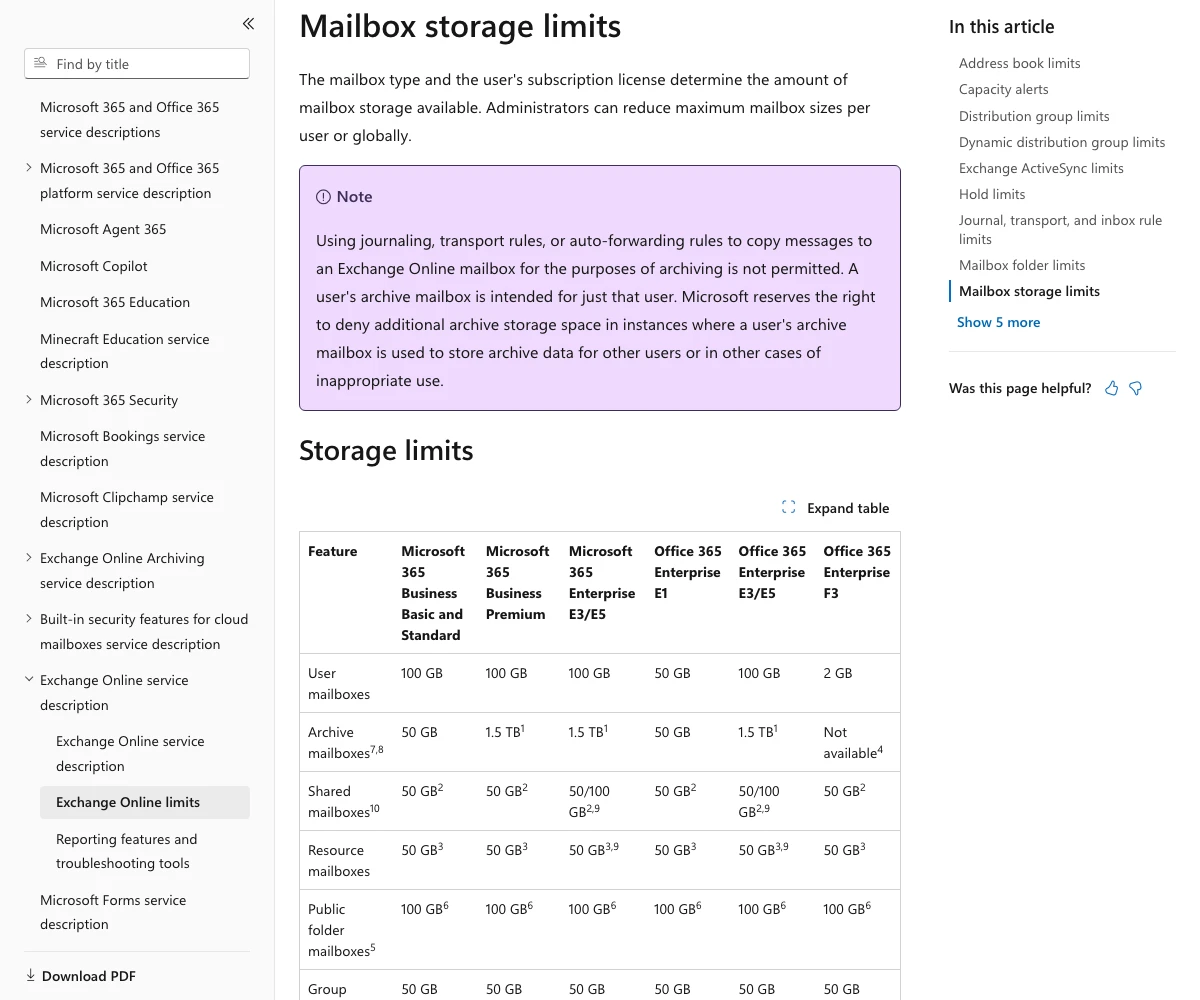
- Microsoft 365 Business Basic and Standard. Each user mailbox holds 100 GB. Microsoft's Exchange Online limits say that once a mailbox hits its limit, it rejects incoming mail and sends a bounce to the sender.
- T3CHS mailboxes. A Starter Mailbox holds 5 GB and a Plus Mailbox holds 10 GB, as listed on our business email page.
Check Your MX Record in Two Minutes
Your MX record is a line in your domain's settings that tells the world which server takes your mail. Our DNS records guide covers the other records around it.
- Look it up. Type your domain into our free DNS lookup and read the MX row.
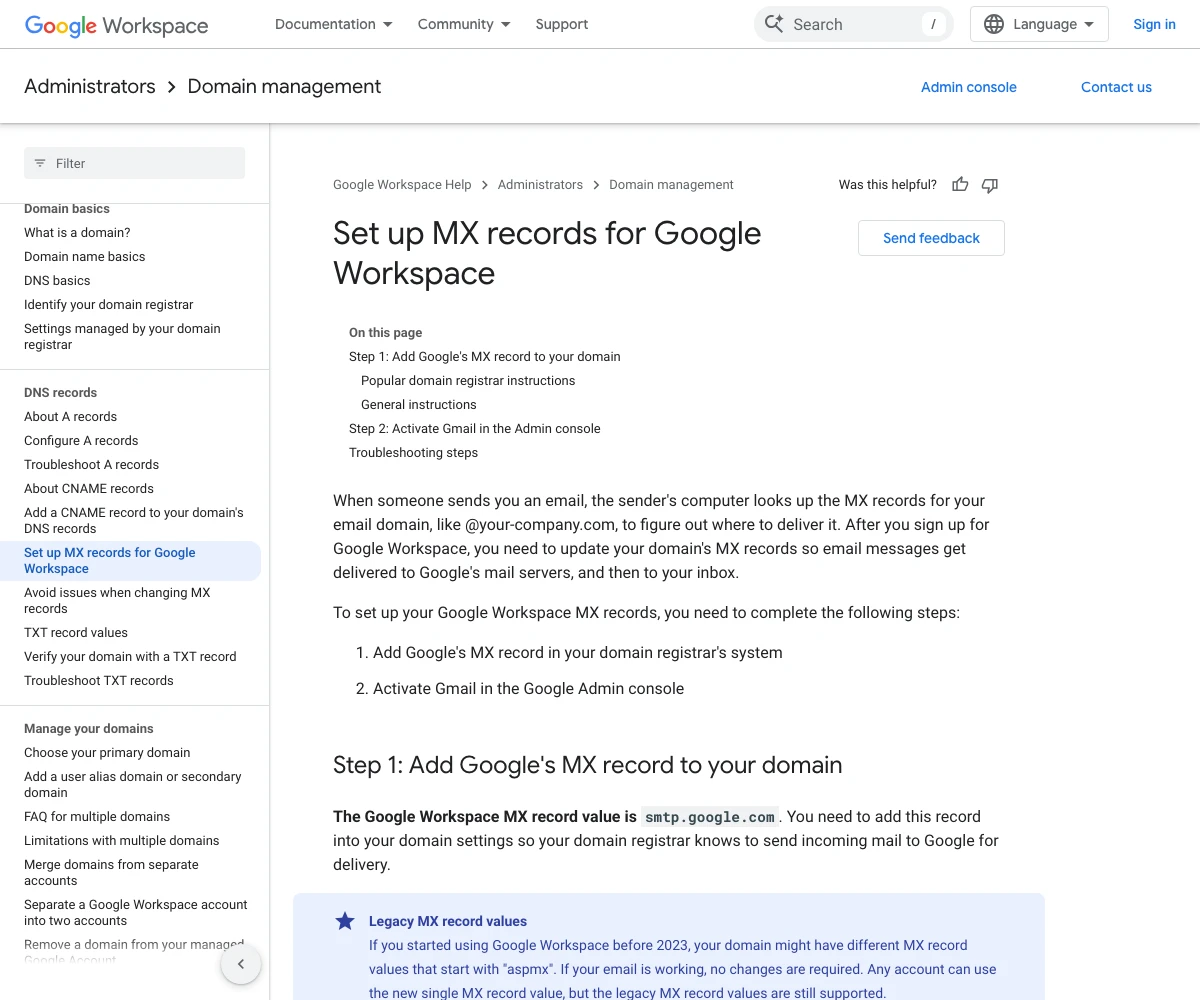
- Match it to who you pay. Google Workspace uses smtp.google.com, per Google's MX setup page. Older Google accounts may show names starting with aspmx, which Google says still work. Microsoft 365 gives each domain its own value, shown in the admin center, per Microsoft's DNS setup page.
- Check for leftovers. Microsoft says to remove MX records for an old provider, or give them a lower priority than the new one. An old record can keep sending mail to a service you left.
- If there is no MX at all, that is the problem. Add the record your email provider gives you.
What Happens With No MX Record
The mail standard, RFC 5321, says that when a domain has no MX record, senders try the domain's main address instead. For most small businesses, that main address is the web server. A later standard, RFC 7505, notes that this fallback sends mail to the server even when it does not accept mail. So the message fails.
The Website Move Trap
This is the cause we see most in real life. An owner moves the website to a new host or site builder. As part of the move, the domain's DNS moves too. The new DNS has the website records and nothing else. Email stops that day, and nobody connects it to the website.
Before any move, save a copy of every DNS record, MX and TXT included. After the move, check the MX record the same day. When you change email providers on purpose, Google's guide to MX changes says the new records can take up to 48 hours to spread. Until then, mail keeps going to the old provider.
What We Found on 2,000 Small Business Domains
Most guides to missing email talk about spam folders. None we read checked how often a business domain is set up to receive mail at all. So on October 19, 2026 we picked 2,000 independent auto repair shop domains at random. Between 7:11 and 7:13 in the morning Pacific time, we looked up each domain's MX record and checked that the mail server it named had an address. We checked every dead mail server name again at 7:14. All of them were still dead.
Three lessons stand out.
- 55 domains point their mail at a server that is gone. 26 pointed at a Microsoft 365 mail address that no longer exists. 18 pointed at a hosted email service the same way. 8 pointed at a mail server on their own domain that had no address. Mail to any address at those domains has nowhere to go, yet the record looks fine at a glance.
- 617 domains had no MX record at all. That is 32 percent of the 1,945 domains whose DNS answered. Many of those shops likely use a free Gmail address instead, and that is fine. But if info@ that domain is printed anywhere, mail to it is not arriving.
- Most working setups use a big provider. Of the 1,260 working MX records, 338 pointed at Google, 180 at Microsoft 365 and 83 at GoDaddy. Another 207 pointed at a mail server on the shop's own domain, often run by the web host.
One more number for the senders. Of those 1,260 working domains, 978 had an SPF record and 406 had a DMARC record. Those records help the mail you send land in the inbox. Our email deliverability guide explains both.
Where Most Advice Falls Short
Most guides on missing email miss four things.
- They never mention MX records. For a business address, the MX record is the first thing to check after spam. The top guides skip it completely.
- They do not read the bounce. A bounce code tells you the cause in one line. Most guides treat it as a footnote.
- They give no real limits. Full mailboxes come up, but rarely with the size limit or what happens at the limit.
- They miss the website move. Changing hosts is how most owners lose mail, and no top result warns about it.
How to Stop It Happening Again
- Send yourself a test once a month. From a personal account, to every address you print on cards and trucks.
- Save your DNS records. Keep a copy before any website, host or email change.
- Turn every printed address into a real mailbox or alias. If info@ is on your truck, make sure it goes somewhere.
- Watch your storage. Clear old mail before you hit the limit, not after.
- Cancel old email services last. Move your MX record first, wait a few days, then cancel.
Our business email setup guide walks through a clean setup from the start.
Get Help With Business Email
T3CHS sets up business email at your own domain, adds the records for you and checks that mail arrives. Call or text (949) 65-T3CHS, or tell us what stopped.
Before You Call
Why am I not receiving emails to my business email?
Check spam and filters first, then send a test from another account and read any bounce. If nothing arrives at all, look up your MX record. A missing MX record or one that points to an old provider stops all mail to your domain.
Why am I suddenly not getting any mail?
When all mail stops at once, something changed. A full mailbox, a website or host move that dropped your MX record, or a canceled email plan are the usual causes.
What is stopping my emails from coming through?
The bounce message tells you. Code 5.1.1 means the address does not exist, 5.2.2 means the mailbox is full, and 5.4.4 means there is no working route to your mail server.
Can I receive email without an MX record?
Sometimes, but do not count on it. Without an MX record, senders try your domain's main address, which is usually your web server. Most web servers do not accept mail, so the message fails.
How long does it take for a new MX record to work?
Often minutes, but Google says to allow up to 48 hours. Until the change spreads, mail keeps going to your previous provider.
Why do I get emails on my computer but not my phone?
If mail shows in the web version but not on the phone, the phone app is not syncing. Remove the account from the phone and add it again.
Cited Pages
- RFC 3463: Enhanced Mail System Status Codesrfc-editor.org
- RFC 5321: Simple Mail Transfer Protocol, Section 5.1rfc-editor.org
- RFC 7505: A Null MX No Service Resource Recordrfc-editor.org
- Google Workspace Help: Set Up MX Records for Google Workspacesupport.google.com
- Google Workspace Help: Avoid Issues When Changing MX Recordsknowledge.workspace.google.com
- Microsoft Learn: Connect Your Domain by Adding DNS Recordslearn.microsoft.com
- Microsoft Learn: Exchange Online Limitslearn.microsoft.com
- Google One Help: How Your Google Storage Workssupport.google.com
Last reviewed October 24, 2026.
See more of our reporting when you search.
Want T3CHS first in Google? Set us as a preferred sourceWhere This Leads
Put it to work
- Business Email HostingEmail on your own domain that lands in the inbox.
- DNS LookupSee the A, MX, TXT, NS and other records for any domain.
More guides
- How to Get Business Email on Your Own DomainPick a provider like Google Workspace or Microsoft 365, create mailboxes, point your MX records to it, then add SPF, DKIM and DMARC.
- DNS Records Explained in Plain EnglishDNS records are the settings that tell the internet where your website and email live, and a few simple types handle almost everything.
- Email Deliverability: SPF, DKIM and DMARC ExplainedSPF, DKIM and DMARC are three DNS records that prove your email is really from you, and big inbox providers now require them from bulk senders.
- All GuidesEvery guide in one place.
Look up a term
- Tech GlossaryPlain meanings for 49 tech words.