Guide
Your Connection Is Not Private: How Site Owners Fix It
Your Connection Is Not Private means the browser could not trust the certificate your site showed it. If one visitor sees it, check their clock and their Wi-Fi. If everyone sees it, the fix is yours. The certificate is expired, made for a different name, or signed by nobody the browser trusts.

Things to Know
- The code under the warning tells you which of three problems you have.
- Expired, wrong name and self signed certificates cause almost every owner side case.
- Check both versions of your address, with www and without. One can work while the other fails.
- On October 19, 2026 we checked 2,000 small business sites. 34 showed this warning on the address they list, and 17 more on the other version.
- Certificate lifetimes keep shrinking, so renewal has to happen on its own.
Why the Browser Stopped the Visit
We look after a lot of small business websites. When a certificate breaks, the owner hears about it from a customer. Usually it is a text with a screenshot of a red warning and the words Your Connection Is Not Private.
In plain words, the warning means this.
- The browser does not trust the certificate your site showed it. So it stops the visit before any page loads.
- If one person sees it, it is probably their device. A wrong clock or a hotel Wi-Fi login page can cause it.
- If everyone sees it, it is your site. The fix lives with your host, your site builder or whoever set up the certificate. This guide shows you which one in a few minutes.
Most guides for this error are written for visitors. They tell you to clear your cache and restart your router. If it is your business site, those steps fix nothing. You need the owner fix.
What the Warning Means
Every secure website shows the browser a certificate. It is a small file that says this site really is yourshop.com, signed by a company the browser trusts. Our SSL guide explains how certificates work.
The browser checks three things before it loads the page.
- Is the certificate still in date?
- Is it made for the exact address in the bar?
- Is it signed by a company the browser trusts?
If any answer is no, Chrome shows Your Connection Is Not Private. Safari, Edge and Firefox show their own version of the same warning.
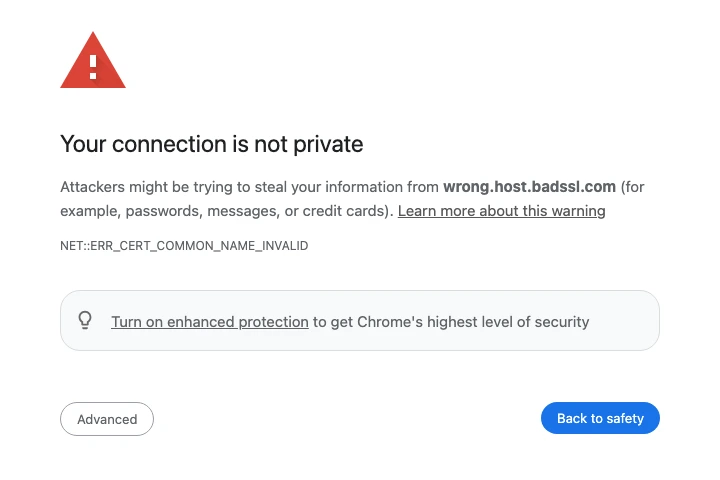
Read the Code Under the Warning
Chrome prints a short code in small gray text. It tells you which check failed. The meanings below come from the list of error codes in Chrome's own source code.
| Code | Which check failed | Most likely cause on a small business site |
|---|---|---|
| NET::ERR_CERT_DATE_INVALID | The date | The certificate expired, or the visitor's clock is wrong |
| NET::ERR_CERT_COMMON_NAME_INVALID | The name | The certificate is for a different address, often your host's own name |
| NET::ERR_CERT_AUTHORITY_INVALID | The signer | The server made its own certificate, called self signed |
Chrome's source lists one more cause for the name error. A public Wi-Fi network can send people to its login page, and that page does not match the site they asked for. That is a visitor problem, not yours.
Is It Your Site or Just One Visitor?
Do this before you call anyone. It takes two minutes.
- Open the site on your own phone with Wi-Fi off. If it loads fine on cell data, the problem is with the network the visitor was on.
- Ask the visitor for the code. NET::ERR_CERT_DATE_INVALID on a phone with the wrong date is a clock problem. Tell them to set the date to automatic.
- Try both versions of your address. Type yourshop.com, then www.yourshop.com. Then try each with https at the front. One can work while the other fails. This is the most missed check of all.
- Click the warning's Advanced button and look, but do not go on. It shows the code and sometimes the name on the certificate. If that name is your host's name, you have found the problem.
If the warning shows on your phone, on cell data, for every visitor, it is your site.
The Five Owner Causes and Who Fixes Each
| Cause | What you might notice | Who fixes it |
|---|---|---|
| Expired certificate | Worked yesterday, broken today, same code on every device | Your host or site builder. Renew it and turn on auto renew |
| Certificate for the wrong name | Code says COMMON_NAME. The certificate shows your host's name | Your host. Add your domain to the account and issue a certificate for it |
| Only one version covered | The www version works and the plain one does not, or the other way around | Your host. Reissue the certificate to cover both names |
| Self signed certificate | Code says AUTHORITY_INVALID | Your host. Replace it with one from a real certificate company |
| Domain points at the wrong server | Started after you moved hosts or edited DNS | Whoever runs your DNS. Point both names at the new host |
Two of these catch owners off guard.
The host's own certificate. When your domain points at a server, but that server was never told about your site, it answers with its own certificate. The browser sees a certificate for the host's name, not yours, and shows the name error. It often happens after a move, a canceled plan or a typo in DNS. Our DNS records guide shows which record points where.
The version you never type. You may only ever type your address one way. Your customers do not. Some type www and some do not, and old links on directories and business cards point to both. If the certificate covers only one, half your visitors can get the warning while the site looks fine to you.
How to Fix It
Work down this list and stop when the warning is gone.
- Check the certificate's dates. Click the padlock or the warning, then the certificate details. If the end date has passed, ask your host to renew it today.
- Check the names on it. The details list every name the certificate covers. Both yourshop.com and www.yourshop.com should be there.
- Check where your domain points. Use our free DNS lookup for both versions of your address. Both should point at the host that holds your certificate.
- Ask your host to reissue the certificate. Most hosts and site builders issue free certificates. If yours makes you buy one, our hosting guide covers what a fair plan includes.
- Turn on automatic renewal. Then ask your host one question. Do my certificates renew on their own? Anything other than yes is a future outage.
- Test again from your phone on cell data. Try all four versions, with and without www, with and without https. All four should land on your site with a padlock.
What to Send Your Host
Copy this and fill in the blanks.
Our site [your domain] shows Your Connection Is Not Private. The code is [the code under the warning]. It happens on [yourshop.com, www.yourshop.com or both]. The certificate it shows is for [the name in the certificate details] and ends on [the date]. Please issue a certificate that covers both versions of our domain and set it to renew on its own.
Why Visitors Sometimes Cannot Click Past It
Some sites tell browsers to only ever connect securely. That setting is called HSTS. MDN's page on HSTS says that when a site has it, the browser will not let visitors bypass a certificate error. So if your site uses HSTS and the certificate breaks, the site is fully down, not just scary. Fix the certificate. Never tell customers to click through.
What We Found on 2,000 Small Business Sites
Most guides for this warning explain it. None we read showed how often it actually happens on small business sites. So on October 19, 2026 we picked 2,000 independent auto repair shop domains at random. Between 7:11 and 7:13 in the morning Pacific time, we checked the certificate on the address each shop lists, and on the other version of that address, with or without www. We checked every failing certificate again at 7:14. All of them were still failing.
1,822 sites showed a valid certificate on the address they list. The chart shows what went wrong on the rest that had a certificate problem.
34 sites showed the warning on the very address they give customers. That is 9 expired, 12 made for the wrong name and 13 self signed. Another 17 worked on the listed address but showed the warning on the other version. Together that is 51 sites, or about 1 in 40.
Four patterns sat behind those numbers.
- Most expired certificates were fresh. 7 of the 9 expired during 2026, and 4 of those ran out in the 16 days before our check. Two had been expired since 2020 and 2023.
- The wrong name was usually the host's name. 7 of the 12 showed a certificate belonging to a hosting or site company instead of the shop. One showed a certificate for an account terminated page. Three showed a certificate for some other website. One covered the name without www while the shop lists the www version.
- Self signed meant a server left on defaults. 11 of the 13 named the shop's domain plus a mail address, the kind of certificate a server makes for itself. One was the stock certificate of a hosting control panel.
- The other version broke quietly. Of the 17, 13 showed a certificate for the wrong name and 4 had expired. An owner who only types one version would never see it.
The 16 with a missing middle certificate are a softer problem. Certificates come in a chain, and those servers left out the link in the middle. Our test tool, like many apps, does not fill in the gap. Some browsers do, so these sites can look fine on your laptop and still fail elsewhere. Your host can fix it by installing the full chain.
Another 42 sites failed before any certificate check, with a broken secure connection. Those show a different error page, not this one.
Renewal Is Now a Monthly Job
Of the 1,822 good certificates, 1,619 were made to last about 90 days. Let's Encrypt signed 1,066 of them and Google Trust Services signed 529. 67 were due to run out within 30 days of our check.
Only 33 still had a certificate made to last about a year. Those were issued before March 15, 2026. Under the CA/Browser Forum rules, certificates issued since then can last at most 200 days, falling to 47 days in 2029. Let's Encrypt also announced its default certificates will drop to 64 days on February 10, 2027 and to 45 days on February 16, 2028. It tells site owners to avoid renewing by hand.
So if anyone still renews your certificate by hand once a year, that plan is already over.
Where Most Advice Falls Short
Most advice for this warning misses four things.
- They are written for visitors. Most of the advice is clear your cache, restart your router, try incognito. That helps a visitor on a bad network. It does nothing for an owner whose certificate expired.
- They skip the other version of the address. In our check, a third of the sites with a warning only had it on the version they do not list.
- They never mention the host's own certificate. It was the most common wrong name we saw, and it points straight at the fix.
- They make clicking through sound fine. On a site with HSTS, visitors cannot click through at all.
How to Stop the Next One
- Turn on automatic renewal and confirm it once. Ask your host, and check the end date on the certificate a week later.
- Cover both versions of your name. One certificate should list yourshop.com and www.yourshop.com.
- Send one version to the other. Pick www or no www, and have the other forward to it, both over https.
- Get an alert. Many uptime monitors also warn you before a certificate expires.
- Check after every move. After you change hosts or DNS, load all four versions of your address from your phone.
Our small business website checklist has the rest of the monthly checks.
Get Help When It Breaks
T3CHS includes SSL that renews on its own with the sites we host, covering both versions of your name. Call or text (949) 65-T3CHS, or tell us what broke.
Before You Call
How do I fix Your Connection Is Not Private on my website?
Read the code under the warning. Renew an expired certificate, reissue one that covers both yourshop.com and www.yourshop.com, or replace a self signed one. Then turn on automatic renewal.
Is Your Connection Is Not Private dangerous?
It can be. The browser cannot confirm who it is talking to, so do not type passwords or card numbers. On a business site you know, it usually means an expired or misconfigured certificate.
Why does my site say not private on one phone but not on another?
Check the date on that phone first, then the network it is on. A wrong clock or a Wi-Fi login page can cause the warning for one device only.
Why does my site work with www but not without it?
The certificate likely covers only one version of your name, or the other version points at a different server. Ask your host to issue a certificate for both and forward one to the other.
How long does it take to fix an expired SSL certificate?
The fix is often quick once your host starts it, since most hosts issue free certificates on their own. The bigger delay is noticing. In our check, 4 of 9 expired certificates had run out in the 16 days before.
Can visitors click past the warning?
Usually there is an Advanced button that lets them go on, but it is not safe. If the site uses HSTS, MDN says the browser will not let visitors bypass the error at all.
Cited Pages
- Chromium source: net_error_list.h (certificate error codes)github.com
- MDN Web Docs: Strict-Transport-Securitydeveloper.mozilla.org
- CA/Browser Forum: Ballot SC-081v3cabforum.org
- Let's Encrypt: Decreasing Certificate Lifetimes to 45 Days (December 2, 2025)letsencrypt.org
- Let's Encrypt: Aboutletsencrypt.org
Last reviewed October 24, 2026.
See more of our reporting when you search.
Want T3CHS first in Google? Set us as a preferred sourceWhere This Leads
Put it to work
- SSL Certificates for Small Business SitesThe padlock that tells customers your site is safe.
- DNS LookupSee the A, MX, TXT, NS and other records for any domain.
More guides
- SSL Certificates Explained for Business OwnersAn SSL certificate locks the connection between your site and each visitor, and most local businesses only need a free one that renews on its own.
- DNS Records Explained in Plain EnglishDNS records are the settings that tell the internet where your website and email live, and a few simple types handle almost everything.
- 502 Bad Gateway: What It Means and How to Fix ItA 502 Bad Gateway means one server in the chain asked another server for your page and got back a broken answer. It is almost never the visitor's fault. If it is your site, the fix is on your host, your CDN or your site's code, and the fastest path is usually a short message to your host with the time, the page and what you changed.
- All GuidesEvery guide in one place.
Look up a term
- Tech GlossaryPlain meanings for 49 tech words.