Guide
502 Bad Gateway: What It Means and How to Fix It
A 502 Bad Gateway means one server in the chain asked another server for your page and got back a broken answer. It is almost never the visitor's fault. If it is your site, the fix is on your host, your CDN or your site's code, and the fastest path is usually a short message to your host with the time, the page and what you changed.
In Short
- A 502 comes from the middleman, like Cloudflare or your host's proxy, not from the visitor.
- Check from your phone on cell data first. If it fails there too, it is the site.
- Most 502s on small sites trace back to an overloaded server, a crashed plugin, a bad DNS change or an expired certificate behind a CDN.
- Google slows its crawl on 5xx errors and drops pages that keep failing.
- On October 18, 2026 we loaded 2,000 small business home pages. None showed a 502, but nine showed another server error, and all nine were still down when we checked again.
The Short Answer
We look after a lot of small business websites. When one of them breaks, the owner usually texts us a screenshot of a white page that says 502 Bad Gateway. Then they ask two things. Is it me? And is it bad?
Here is the plain answer.
- It is almost never you. A 502 means a server in the middle got a bad answer from the server behind it. Your phone, your browser and your Wi-Fi are rarely the cause.
- It is bad if it lasts. A 502 for a few seconds during a restart is normal. A 502 that lasts an hour means calls and bookings are going somewhere else.
- The fix is upstream. Your host, your CDN or your site's code. This guide shows you how to find which one in about five minutes, without logging into a server.
What a 502 Bad Gateway Means
Most websites do not answer you directly anymore. Your visit goes through a chain.
- Your browser asks for the page.
- A front server takes the request. This can be a CDN like Cloudflare, a load balancer, or your host's own proxy.
- That front server asks the real web server behind it, often called the origin, to build the page.
- The origin sends the page back up the chain.
A 502 means step 4 went wrong. The front server reached the origin, but the answer it got back was invalid. The web standard for HTTP, RFC 9110, defines it as a server acting as a gateway or proxy that got an invalid response from the server behind it. MDN adds that the fix usually needs the server owner, except when the problem is the visitor's own network, VPN or proxy.
502 vs 503 vs 504
These three get mixed up all the time. They point to different fixes.
| Code | What it means | Where to look first |
|---|---|---|
| 500 Internal Server Error | The site's own code crashed | A plugin, theme or recent update |
| 502 Bad Gateway | The middle server got a broken answer from the origin | The origin server, its software and its certificate |
| 503 Service Unavailable | The server says it is busy or down for upkeep, for now | Traffic spikes, a maintenance mode left on |
| 504 Gateway Timeout | The middle server waited and got no answer in time | A slow page, a slow database, an overloaded server |
The meanings come from RFC 9110 sections 15.6.1 to 15.6.5. MDN notes that when the origin sends no answer at all, the proxy should send a 504 instead of a 502.
Is It Your Site or Just You?
Do this before you call anyone. It takes two minutes.
- Reload once. Wait 30 seconds and reload. Servers restart, and a short 502 during a restart is normal.
- Try your phone on cell data. Turn off Wi-Fi first. If the site loads on cell data but not at the office, the problem is your network, VPN or office firewall. If it fails on both, it is the site.
- Try a different page. Load your home page and one inner page. If only one page fails, it is that page's code, a form, a booking widget or a slow database call.
- Look at the error page itself. Who drew it? A page with Cloudflare's logo and three boxes means the visit reached Cloudflare and Cloudflare could not get a good answer from your server. A bare page that just says nginx or Apache came from your host's server software.
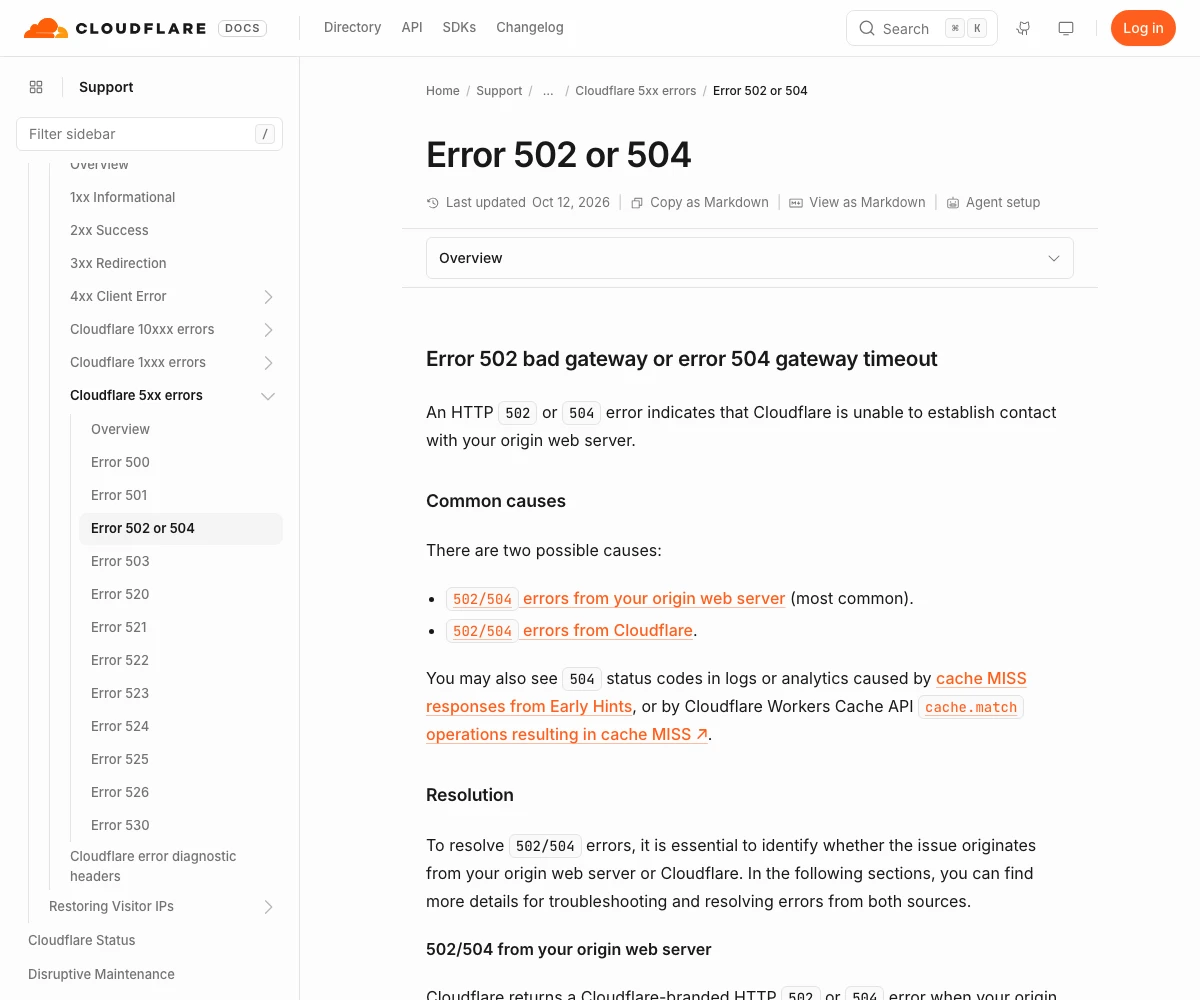
If you use Cloudflare, that last check tells you a lot. Cloudflare's own docs say a Cloudflare branded 502 or 504 means your origin server returned the error, and that this is the most common case. A blank page with no branding came from Cloudflare itself.
The Six Usual Causes on a Small Business Site
The top results for this error are written for engineers who run their own servers. Most small businesses do not. You have a host, maybe a CDN, maybe WordPress. So here are the causes we actually run into, and who fixes each one.
| Cause | What you might notice | Who fixes it |
|---|---|---|
| Server out of memory or CPU | Site fails at busy times, works at night | Your host. Ask about your plan's limits |
| A plugin or theme crashed | Started right after an update | You or your web person. Undo the update |
| DNS points to the wrong place | Started right after you moved hosts or changed DNS | Whoever runs your DNS |
| Expired or wrong certificate on the origin | Works without a CDN, fails through it | Your host. Renew or reissue the certificate |
| Firewall blocks the CDN | Only visitors through the CDN get errors | Your host. Allow the CDN's IP addresses |
| Host outage | Other sites at the same host are down too | Your host. Check their status page and wait |
Two of these are worth a closer look, because owners rarely suspect them.
The certificate behind the CDN. Visitors see a padlock from your CDN, so everything looks fine. But the CDN also talks to your origin over HTTPS. Amazon's CloudFront docs list an expired, invalid or self signed certificate on the origin as a cause of a 502, along with a certificate whose name does not match. Our SSL guide explains how renewals work.
The DNS change you made last week. If you moved hosts, the CDN may still be pointed at the old server, or at a name that no longer resolves. CloudFront even has its own DNS error code for this case. Our DNS records guide shows which record points where.
How to Fix It Without Touching the Server
You do not need a server login for most of this. Work down the list and stop when the site comes back.
- Ask what changed. A plugin update, a new theme, a DNS edit, a host move, a new firewall rule. Most 502s start within an hour of a change.
- Check your host's status page. Search your host's name plus status. If they list an incident, wait it out and save the time for your records.
- Undo the last change. Roll back the update, or restore last night's backup in your host's panel. A restore is often faster than finding the bug.
- On WordPress, turn off plugins. If you can reach the dashboard, deactivate plugins one at a time. If you cannot, the WordPress docs show how to rename the plugins folder in
wp-contentfrom your host's file manager. That turns them all off at once. - On Cloudflare, pause it for one test. Pausing Cloudflare for the site sends visitors straight to your server. If the site works with Cloudflare paused, the problem is between Cloudflare and your server, often the certificate or a firewall. Turn it back on after the test.
- Message your host. If none of the above fixed it, it is their turn. Use the message below.
What to Send Your Host
Support teams fix things faster when you give them facts, not feelings. Copy this and fill in the blanks.
Our site [your domain] is showing 502 Bad Gateway. It started at [time and time zone]. It fails on [home page, or the exact page]. It fails from [office Wi-Fi and phone on cell data]. The error page is [Cloudflare branded, or plain nginx or Apache]. The last change we made was [what, and when]. Can you check the server error log for that time and tell us what the origin returned?
If you use Cloudflare, Cloudflare's docs also ask for the output of yourdomain.com/cdn-cgi/trace when you open a ticket with them. Open that address in your browser and paste what it shows.
Does a 502 Hurt Your Google Rankings?
A short one does not. A long one does.
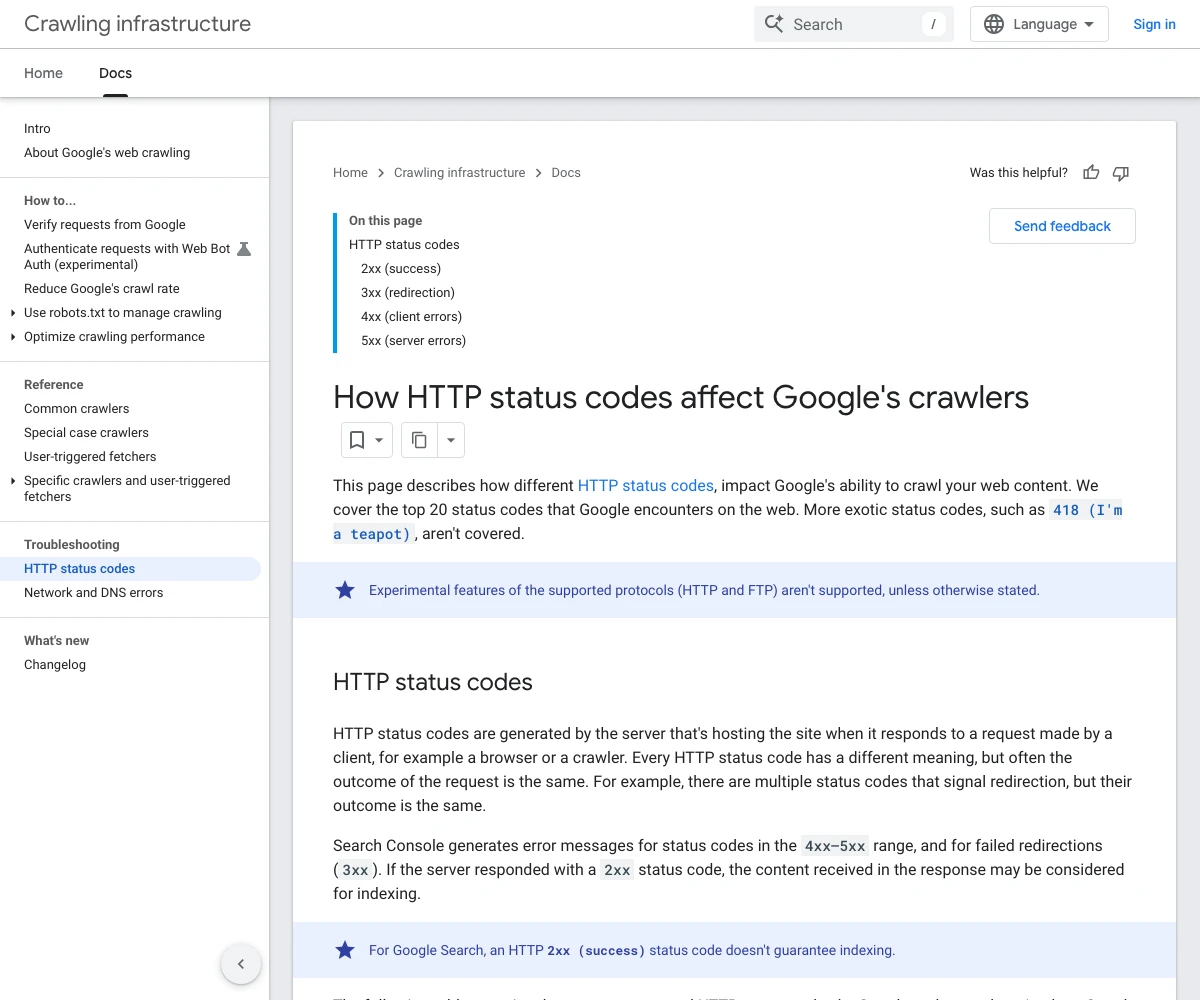
Google says 5xx errors, which include 502, make its crawlers slow down for a while. Content from a page that returns a 5xx is ignored. Pages already in the index are kept at first, but they are eventually dropped if they keep failing. Once the server answers normally again, Google raises its crawl rate back up bit by bit. That is all on Google's page on how HTTP status codes affect its crawlers, last updated February 4, 2026.
If you take a site down on purpose, do not leave it on a 502. Google's guide to pausing a website says to return a 503 with an information page if you must disable a site for one or two days, and calls a full shutdown an extreme step for a few days at most.
So the rule for owners is simple. Minutes do not matter. Days do. If your site has thrown errors for more than a day, fix it first and then check the Pages report in Search Console. Our guide on why Google won't index your pages walks through that report.
What We Saw on 2,000 Small Business Sites
Most 502 guides explain the error. None we read showed how often small business sites are actually broken. So on October 18, 2026 we picked 2,000 independent auto repair shop websites at random and loaded each home page once, between 7:11 and 7:13 in the morning Pacific time. Then we loaded every failure again about three minutes later.
Not one site showed a 502 in that pass. That fits what a 502 usually is, a short break during a restart or an update. But nine sites showed another server error, and every one of the nine was still failing on the second try. Here is what they were.
| What the server said | Sites | What it points to |
|---|---|---|
| Cloudflare 522, connection timed out | 2 | The origin server did not answer Cloudflare in time |
| Cloudflare 530, origin name not found | 1 | DNS behind Cloudflare is broken |
| 500 with a WordPress critical error | 2 | A plugin or theme crashed |
| 500 with no message | 1 | The site's code or server setup failed |
| 503 maintenance page | 1 | A maintenance mode left on |
| 503 from a site builder platform | 1 | The builder's own service for that site |
| 503 bot check from the host | 1 | Not down. The host challenged our visit |
Three lessons for owners.
- Behind Cloudflare, a dead server often shows a different number. Cloudflare's 522 page says it means Cloudflare could not connect to your origin in time, often because the server is overloaded, offline or blocking Cloudflare. Its 530 page says Cloudflare could not resolve the origin's name. Same root causes as a 502, different code. Treat any 5xx the same way.
- The broken sites stayed broken. A 502 that clears on reload is noise. A 5xx that is still there minutes later is an outage. Unless you have an alert set up, the first person to notice is usually a customer.
- The bigger leaks were not server errors. 57 domains did not resolve at all, and 37 failed the certificate check. Those are expired domains and lapsed certificates, and they cost far more traffic than any 502. Our guides on what happens when a domain expires and on certificates cover both.
About a third of the sites, 676 of 2,000, answered through Cloudflare. If yours is one of them, learn the Cloudflare error pages. They tell you whether to call your host or check your CDN settings.
What the Top Results Get Wrong
We read the pages that rank for this error before we wrote this one.
- They assume you have a server. The top guides start with SSH, log files and timeout settings. Most small business owners have a host panel and a support line. The first steps should be ones you can do from a phone.
- They oversell the visitor fixes. Clearing your cache and restarting your router fill half of most guides. A 502 is a server to server failure. Those steps help only when the problem is your own network, and our phone on cell data test rules that out faster.
- No message for the host. Not one top result told owners what to send their host. That message is the fastest fix most owners have.
- No sense of how long is too long. Google's own docs draw the line. Short errors are fine. Errors that persist get pages dropped.
How to Stop the Next One
Most 502s cannot be stopped forever, but you can make them short and rare.
- Get an uptime alert. A free uptime monitor checks your home page every few minutes and texts you when it fails. You hear about it before a customer does.
- Update on a weekday morning. Never update plugins or themes on a Friday night. If an update breaks the site, you want your host's support awake.
- Keep nightly backups you can restore in one click. Check once that the restore actually works.
- Size the plan for your busy hour. If the site fails every Monday at 9am, you have outgrown the plan. Our guide on what hosting a small business needs helps you size it.
- Write down who runs what. Your registrar, your DNS, your CDN, your host and their support numbers. In an outage, that list saves the first half hour.
Get Help When It Breaks
If you would rather not chase errors yourself, T3CHS offers hosting for small business sites we build. There are no plugins to break, and every version is saved, so a bad change rolls back in one step. Call or text (949) 65-T3CHS, or tell us what broke.
Common Questions
Is error code 502 my fault?
Almost never. A 502 means a server in the middle got a bad answer from the server behind it. It is only your side when your own network, VPN or proxy is the problem, so test once on your phone with Wi-Fi off.
Will error 502 fix itself?
Often, yes. A 502 during a server restart or a short spike clears in seconds or minutes. If it is still there after a few reloads over 10 minutes, something is broken and your host needs to look.
How long does a 502 Bad Gateway last?
There is no set time. Short ones last seconds. In our check of 2,000 small business sites on October 18, 2026, every site that showed a server error was still failing about three minutes later.
How do you fix a 502 Bad Gateway?
Find out what changed, check your host's status page, undo the last update or restore a backup, turn off WordPress plugins, and then send your host the time, the page and the error page type.
What is the difference between a 502 and a 504 error?
A 502 means the middle server got an invalid answer from the origin. A 504 means it got no answer in time. Both point to the origin server, but a 504 more often means something is slow.
Does a 502 error hurt SEO?
Not if it is short. Google slows its crawl on 5xx errors and ignores the content of failing pages. Pages that keep failing are eventually dropped from the index.
Sources
- RFC 9110: HTTP Semantics, Server Error 5xxrfc-editor.org
- MDN Web Docs: 502 Bad Gatewaydeveloper.mozilla.org
- Cloudflare Docs: Error 502 or 504developers.cloudflare.com
- Cloudflare Docs: Error 522developers.cloudflare.com
- Cloudflare Docs: Error 530developers.cloudflare.com
- AWS Docs: CloudFront HTTP 502 Status Code (Bad Gateway)docs.aws.amazon.com
- Google Crawling Infrastructure: How HTTP Status Codes Affect Google's Crawlersdevelopers.google.com
- Google Search Central: Pausing or Disabling a Websitedevelopers.google.com
- WordPress Developer Resources: Common WordPress Errorsdeveloper.wordpress.org
Last reviewed October 19, 2026.
See more of our reporting when you search.
Want T3CHS first in Google? Set us as a preferred sourceKeep Reading
Put it to work
- Small Business Web HostingFast, backed up hosting for small business sites.
- DNS LookupSee the A, MX, TXT, NS and other records for any domain.
More guides
- What Hosting Does a Small Business NeedMost local business sites do well on managed WordPress or good shared hosting, as long as it includes free SSL, backups, updates and real support.
- SSL Certificates Explained for Business OwnersAn SSL certificate locks the connection between your site and each visitor, and most local businesses only need a free one that renews on its own.
- DNS Records Explained in Plain EnglishDNS records are the settings that tell the internet where your website and email live, and a few simple types handle almost everything.
- All GuidesEvery guide in one place.
Look up a term
- Tech GlossaryPlain meanings for 49 tech words.