Guide
How to Delete a Google Business Profile, or Close It Instead
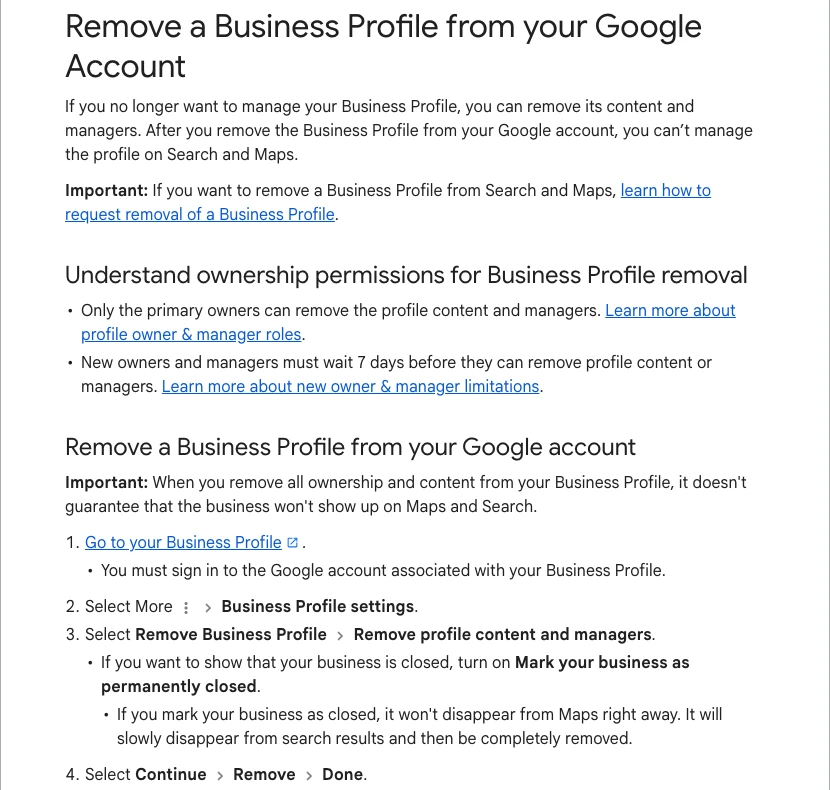
Sign in as the primary owner at business.google.com. Open More, then Business Profile settings, then Remove Business Profile, and pick Remove profile content and managers. That deletes your photos, posts and review replies. It doesn't delete the listing. Customer reviews stay, and the business can keep showing on Maps unless you also mark it permanently closed.

Three Things to Know
- Only the primary owner can remove a profile, and a new owner or manager has to wait 7 days first.
- Removing a profile deletes what owners posted, but customer reviews and other user content stay on Google.
- If you sold the business, transfer primary ownership instead, so the buyer keeps the reviews.
Most owners think deleting a Google Business Profile takes the business off Google. It doesn't. Google's own help page says that removing all ownership and content doesn't promise the business won't show up on Maps and Search.1 What you delete is your control and your content. The listing can live on without you.
So before you press Remove, decide what you really want. Gone for good, closed for now and handed to someone else are three different jobs, with three different buttons.
Pick the Right Move First
Most people who search for this don't need a delete at all. Match your situation to the row below.
| Your situation | What to do | What happens to reviews |
|---|---|---|
| Closed for good | Mark it permanently closed, then remove it | They stay on the listing1 |
| Closed more than 7 days, coming back | Mark it temporarily closed2 | They stay |
| Closed 7 days or less | Set special hours2 | They stay |
| You sold the business | Transfer primary ownership to the buyer3 | They stay with the profile3 |
| You just want off the profile | Remove only your own account1 | They stay, and other managers keep control |
| The listing never existed | Request removal through Google Maps4 | The listing comes down if Google approves it |
If you only remember one row, make it the sale. Deleting a profile you just sold throws away the reviews the buyer paid for.
How to Delete a Google Business Profile, Step by Step
These are Google's steps for one profile.1 They take about a minute.
- Go to business.google.com and sign in with the Google account tied to the profile.
- Select More (the three dots), then Business Profile settings.
- Select Remove Business Profile, then Remove profile content and managers.
- If the business has closed, turn on Mark your business as permanently closed.
- Select Continue, then Remove, then Done.
Do you manage a few locations? In the Business Profile Manager, check the profiles you want gone. Then select Actions, Remove businesses and Remove. If that throws an error, Google says to remove each profile one at a time.1
Why the Remove Button Fails
Two rules cause most of the trouble. First, only the primary owner can remove the content and managers. Other owners and managers can only remove themselves.1 Second, anyone new to the profile has to wait 7 days before they can remove anything.1 That 7 day lock also blocks a brand new owner from deleting the profile or handing off primary ownership.3
So if the button is missing, check who you are on the profile. Then check the date you were added.
What Google Deletes and What It Keeps
Removing a profile is permanent, and it hits every owner and manager at once.1 It splits three ways.
- Gone for good. Posts, photos, videos and review replies that owners and managers added.1
- Still on Google. Customer reviews and anything else customers added.1
- No undo. Removed content can't be brought back. To manage the business again, you have to verify it again from scratch.1
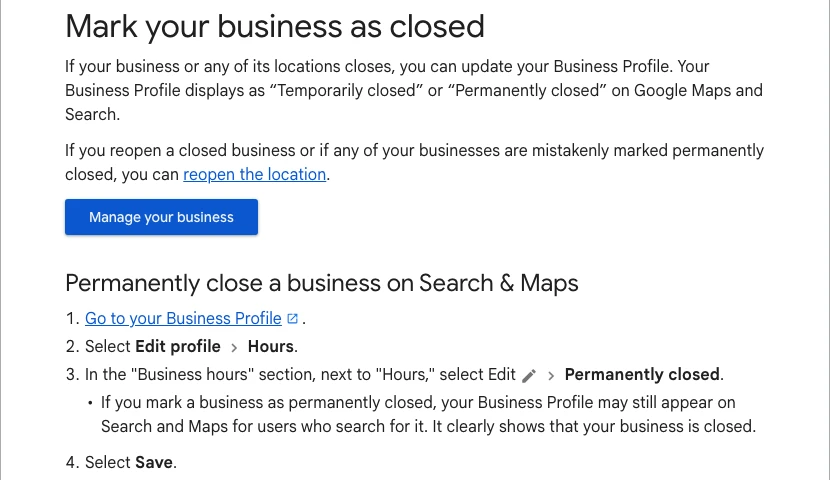
The listing itself fades slowly. A business marked closed doesn't drop off Maps right away. Google says it slowly leaves search results first and is then fully removed.1 Until then, a permanently closed profile can still show for people who search the name, with a clear closed label.2
That's why I'd almost always mark a business closed before removing it. A profile you remove without that toggle can sit on Maps looking open, with old hours and a phone nobody answers. A closed label tells people the truth while the listing fades.
To mark a business closed without removing it, go to Edit profile, then Hours. Next to Hours, select the edit pencil, then Permanently closed or Temporarily closed, and save.2 Closed by mistake? Google lets you reopen the location.2
If You Sold the Business
Don't delete it. Hand it over. Google says a transfer keeps the business info, like reviews, in place.3
- Add the buyer to the profile as an owner or manager first. You can't hand ownership to someone who isn't on it yet.3
- Go to More, then Business Profile settings, then People and access.
- Select the buyer. Next to Access, select Edit.
- Select Primary owner, then Save.3
Only the primary owner can make this switch.3 And the buyer gets the same 7 day wait before they can run every feature.3 So I'd add them a week before the sale closes, not on the last day.
Once they're in, you can remove just your own account. That leaves the buyer, the content and the reviews where they are.1
Removing a Listing From Maps When You Don't Own It
Maybe an old location or a fake listing is still out there, and nobody has access. Anyone with a Google account can ask for a change.4
- Sign in to your Google account and find the place on Google Maps.
- Select Suggest an edit, then Place closed or not here.
- Pick Permanently closed, Temporarily closed or Doesn't exist here.
- Select Submit.5
Google reviews every edit, so it can take a while to show.5 Keep your hopes in line, too. Google removes a listing this way when the business never existed or isn't allowed on Google.4 A real business that closed gets a closed label, not a delete.
Close Down the Rest of Your Online Footprint
Your profile points people to other things you own. Your website, your domain, your phone and your email all outlive the listing. If you walk away from them, someone else can pick them up.
On October 30, 2026 we checked 300 auto repair shop domains drawn from the 20,097 we track. Thirteen weren't registered anymore, yet each was still listed as a shop's website. The full study is in our guide to checking how old a domain is. A lapsed name like that can be bought by anyone, and it still collects the clicks from every old listing that names it.
Work down this list the week you close.
- Google. Mark the profile permanently closed, then remove it.1
- Apple Maps. In Apple Business, go to Brands, then Locations, and select the location. Then choose Preferences, Manage, Remove Location and the reason This location is permanently closed. It may still show in Apple Maps afterward, but you can't edit it anymore.6
- Bing, Yelp and other listings. Mark each one closed from its own dashboard.
- Your domain. Decide whether to renew it or let it go. After a name is deleted, the old owner gets a 30 day redemption period to restore it, and then anyone can register it.7 Our guide to what happens when a domain expires walks through that clock.
- Your email. Keep the mailbox or a forward running for a few months, so last invoices and refunds still reach you.
If you're closing one location and keeping the business, keep the website going. As our guide on whether you need a website explains, your site is the one place online that a platform can't take away.
Need a Hand Shutting It Down?
T3CHS keeps domains renewed and business email running for small businesses, so a closed location never leaves a name for someone else to grab. Call or text (949) 65-T3CHS, or tell us what you're closing.
Before You Call
Can I delete a Google Business Profile if I'm not the owner?
No. Only the primary owner can remove a profile's content and managers. If nobody has access, sign in to Google Maps, select Suggest an edit, then Place closed or not here. Google only removes a listing that way when it never existed or isn't allowed on Google.
Will deleting my Google Business Profile delete my reviews?
No. Removing a profile deletes the posts, photos, videos and review replies that owners added. Customer reviews and other content customers added stay on Google.
How long does it take for a closed business to disappear from Google Maps?
Google doesn't give a set time. A business marked closed slowly leaves search results first and is then fully removed. Until then it can still show to people who search the name, with a closed label.
Can I undo removing a Google Business Profile?
No. Removed content can't be brought back, and you have to verify the business again to manage it. If you only marked the business permanently closed by mistake, Google lets you reopen the location.
Why can't I remove my Google Business Profile?
Most of the time you aren't the primary owner, or you were added in the last 7 days. If you're removing several profiles at once and get an error, remove each one by itself.
Cited Pages
- Google Business Profile Help: Remove a Business Profile From Your Google Accountsupport.google.comOpened November 2026
- Google Business Profile Help: Mark Your Business as Closedsupport.google.comOpened November 2026
- Google Business Profile Help: Transfer Primary Ownership of a Business Profilesupport.google.comOpened November 2026
- Google Business Profile Help: Request Removal of a Business Profile From Google Search and Mapssupport.google.comOpened November 2026
- Google Maps Help: Mark a Place Reopened or Closed on Google Mapssupport.google.comOpened November 2026
- Apple Business User Guide: Edit or Remove a Single Locationsupport.apple.comOpened November 2026
- ICANN: Expired Registration Recovery Policyicann.orgOpened November 2026
Last reviewed November 25, 2026.

About Brodie Childers
Brodie Childers is a licensed electrician who owns JCAB Electric and AmpLocally, a California electrician directory. He is a content creator at T3CHS. He writes about business listings and the tools trades use to get found.
Author Source EEAT Authors · Brodie's Author Page
See more of our reporting when you search.
Want T3CHS first in Google? Set us as a preferred sourceWhere This Leads
Put it to work
- Website Design for Small BusinessWebsite design and builds for your trade.
- DNS LookupSee the A, MX, TXT, NS and other records for any domain.
More guides
- Do I Need a Website for My Business?Most local businesses do need a website, even with a Google Business Profile and social pages. It is the one place online you fully own, and it answers the questions customers check before they call. A small, fast site is usually enough.
- What Happens When Your Domain ExpiresWhen a domain expires, your website and email stop working soon after, but you usually still have time to renew. Under ICANN rules you get reminders before the date, a window to renew after it, and often a 30 day restore period after that.
- How to Check How Old a Domain Is, and When the Date LiesLook the domain up at lookup.icann.org and read the created date. That's the day the current registration began. Then search the name in the Wayback Machine. If its oldest saved page is years older than that created date, the name was dropped and bought again, and the site you see now may have a different owner.
- All GuidesEvery guide in one place.
Look up a term
- Tech GlossaryPlain meanings for 49 tech words.